Klaviyo vs Shopify Revenue: Why the Numbers Do Not Match

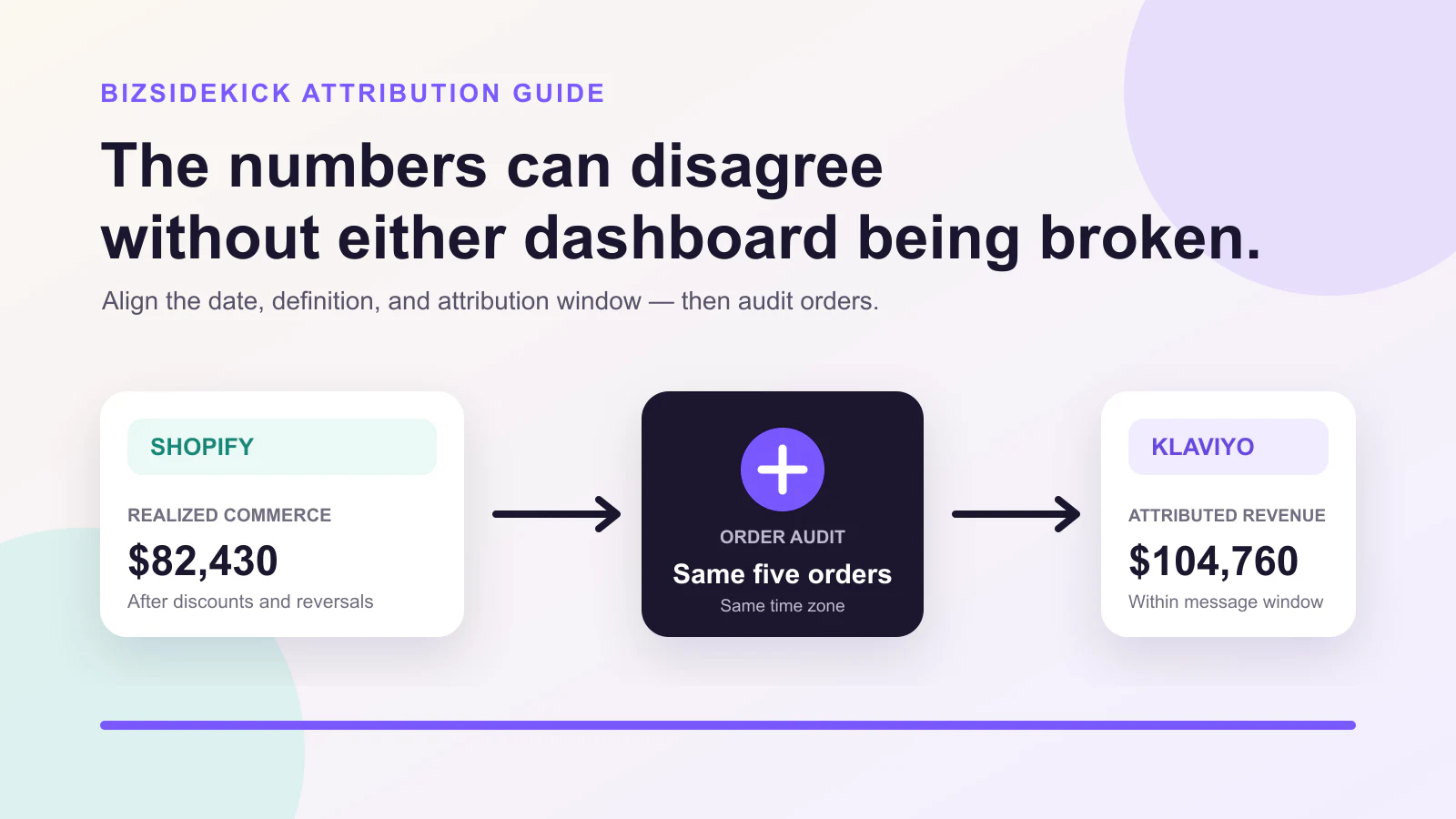
The quick answer: the totals can both be internally correct
Klaviyo and Shopify do not have to show the same revenue for the same calendar range.
Shopify records commerce outcomes and offers its own marketing-attribution views. Klaviyo attributes conversion events to email and SMS interactions under Klaviyo's configured settings. The two systems can differ on:
- What counts as revenue
- Which interaction receives credit
- How long the attribution window remains open
- Which date receives the conversion
- How refunds, cancellations, and later order changes appear
- Which time zone defines the reporting day
Do not diagnose a tracking problem from two top-line totals alone.
Use this sequence:
- Align the date range, time zone, currency, and order states.
- Write the revenue formula used by each report.
- Record the current Klaviyo attribution settings.
- Select the same five Shopify orders.
- Compare each order's commerce outcome with its Klaviyo events and message interactions.
- Classify the gap as expected overlap, timing, definition, missing tracking, or unresolved.
- Assign one ledger to each business decision.
The goal is not to force the dashboards to match. It is to know which number supports which decision.
What Shopify revenue measures
Shopify can expose several sales and marketing views. The useful commerce view starts with the order:
- Order and line-item values
- Discounts
- Sales reversals and refunds
- Taxes and shipping
- Financial and fulfillment status
- Order and transaction times
Shopify defines net sales as gross sales minus discounts and sales reversals. Total sales includes additional amounts such as taxes, shipping, and fees. See Shopify's finance report definitions.
Shopify marketing reports then assign marketing credit using available attribution models and dimensions. Those reports answer a different question from the order ledger. Shopify explains that attribution views can include first click, last click, last non-direct click, any click, and linear models depending on the report context. It also warns that any-click analysis can credit more than one channel for an order. Review the current rules in Shopify's marketing reports documentation.
That gives Shopify at least two valid views:
- Commerce outcome — What happened to the order?
- Shopify marketing attribution — Which marketing interaction receives credit under the selected model?
Do not call both “Shopify revenue” without naming the report.
What Klaviyo attributed revenue measures
Klaviyo receives commerce events from the Shopify integration and attributes eligible conversion events to messages under the account's attribution settings.
Klaviyo's Shopify data reference explains how events such as Placed Order are represented and why its revenue can differ from Shopify's. One important boundary is that Shopify's treatment of canceled and refunded orders can differ from the revenue attached to the original Klaviyo conversion event. Later adjustments also do not necessarily rewrite the original event in the way an operator expects. Review the current event details in Klaviyo's Shopify data reference.
Klaviyo message attribution uses configurable windows. The exact settings in a live account matter more than a default described in a blog post. Klaviyo also distinguishes attribution by conversion event and message timing, so reports with different date logic can produce different totals. See Klaviyo's message attribution documentation.
Klaviyo attributed revenue therefore answers:
Which eligible conversion events did Klaviyo credit to these messages under the current attribution contract?
It does not claim that the money belongs exclusively to Klaviyo or that no other channel influenced the order.
Seven reasons Klaviyo and Shopify revenue differ
1. The attribution windows are different
A customer can click an email and purchase later. Klaviyo can still attribute the conversion when it falls inside the configured message window. A Shopify report using a different model or lookback can assign credit elsewhere.
Record the actual account settings:
- Email click window
- Email open window, when applicable
- SMS click window
- Eligible conversion metric
- Any account-specific or historical change
If settings changed, record the effective date. A month-to-month comparison can be misleading when the contract changed between periods.
2. An open, click, or another eligible interaction receives credit
Klaviyo's message logic and Shopify's marketing reports do not necessarily use the same eligible interaction.
An email open can be a weaker signal than a link click. Privacy features can also affect open-event interpretation. Keep open-attributed and click-attributed outcomes separate when the distinction changes a decision.
For instrumentation troubleshooting, use Klaviyo's conversion tracking guide, but do not assume every mismatch is a tracking failure.
3. Refunds and cancellations are treated differently
Consider an order placed for $120 and later partially refunded by $20.
A Shopify realized-commerce view can show $100 after the reversal. The original Klaviyo Placed Order event can still carry the value associated with the conversion event under the integration's documented behavior.
Both values describe real events:
- $120 was placed after an eligible interaction.
- $100 remained after the commerce reversal.
The mistake is using the first value as final realized revenue without a refund adjustment.
4. The reports use different dates
An email can be sent on Monday, clicked on Wednesday, and lead to an order on Friday.
A report grouped by message send date, event date, order date, or transaction date can put the same conversion into different daily or weekly buckets. Time-zone boundaries add another shift.
Write down:
- Report time zone
- Start and end timestamps
- Whether the end is inclusive
- Message-send date versus conversion-event date
- Order date versus refund date
Comparing “July” is not enough if one report ends at UTC midnight and another uses the store's local time.
5. Order edits and late updates do not produce the same historical rewrite
Orders can be edited after placement:
- Quantity changes
- Item changes
- Discount changes
- Partial refund
- Full cancellation
- Tag or metadata update
The commerce system can reflect the latest outcome while an event-based marketing system preserves the original event or represents later events separately. Use the provider's current integration reference to check which fields and events re-sync.
Do not assume “near real time” means “every historical metric is rewritten after every edit.”
6. Tracking and identity are incomplete
Some orders cannot be connected confidently to a Klaviyo profile or message interaction:
- Cookies or consent are unavailable.
- A customer changes device or browser.
- Link tracking or UTM parameters are missing.
- The purchase uses a different email address.
- A custom checkout or redirect breaks the intended path.
- Integration or event delivery failed.
Missing attribution does not mean the order did not happen. It means the channel link is incomplete.
Investigate a tracking failure when the order-level evidence shows a repeated break under conditions that should be measurable, not merely because one aggregate is lower.
7. Multiple channels can claim the same order
A customer can click a Meta ad, later open a Klaviyo flow email, and finally return through a direct visit. Meta, Klaviyo, and a Shopify attribution view can each give credit under different rules.
Those channel totals are not additive:
Klaviyo attributed revenue
+ Meta attributed revenue
+ Google attributed revenue
≠ realized Shopify revenue
Use channel attribution to diagnose and optimize within its contract. Use commerce outcomes as the realized order ledger.
Audit five orders instead of comparing only totals
A five-order sample is small enough to complete and large enough to reveal several common causes. Choose deliberately varied orders:
- Attributed to a Klaviyo flow, not refunded
- Attributed to a campaign, later refunded or canceled
- Shopify attributes elsewhere, but Klaviyo claims the order
- Shopify order with no Klaviyo attribution
- Purchase delayed near the edge of the attribution window
For each order, capture:
| Field group | Fields to compare |
|---|---|
| Order identity | Order ID, customer/profile identifier, currency |
| Commerce outcome | Gross value, discounts, reversal, realized net value |
| Timing | Message send, open, click, order, refund, time zone |
| Klaviyo evidence | Message, flow/campaign, event, attributed value, window |
| Shopify evidence | Order outcome, available referrer/UTM, attribution view |
| Classification | Expected, timing, definition, tracking, duplicate credit, unresolved |
Do not copy unnecessary personal data into a reconciliation sheet. Use stable operational identifiers and the minimum authorized fields required for the task.
A practical comparison rule
For every sampled order, answer four questions:
- Did the Shopify order occur and what is its current financial outcome?
- Did Klaviyo receive the expected conversion event?
- Which message interaction did Klaviyo credit, under which window?
- Does the difference follow the documented contract, or is evidence missing?
When all five differences follow the contract, the aggregate mismatch is likely expected. When the same expected event is repeatedly absent, escalate the tracking or integration path.
Use the Three-Ledger Model
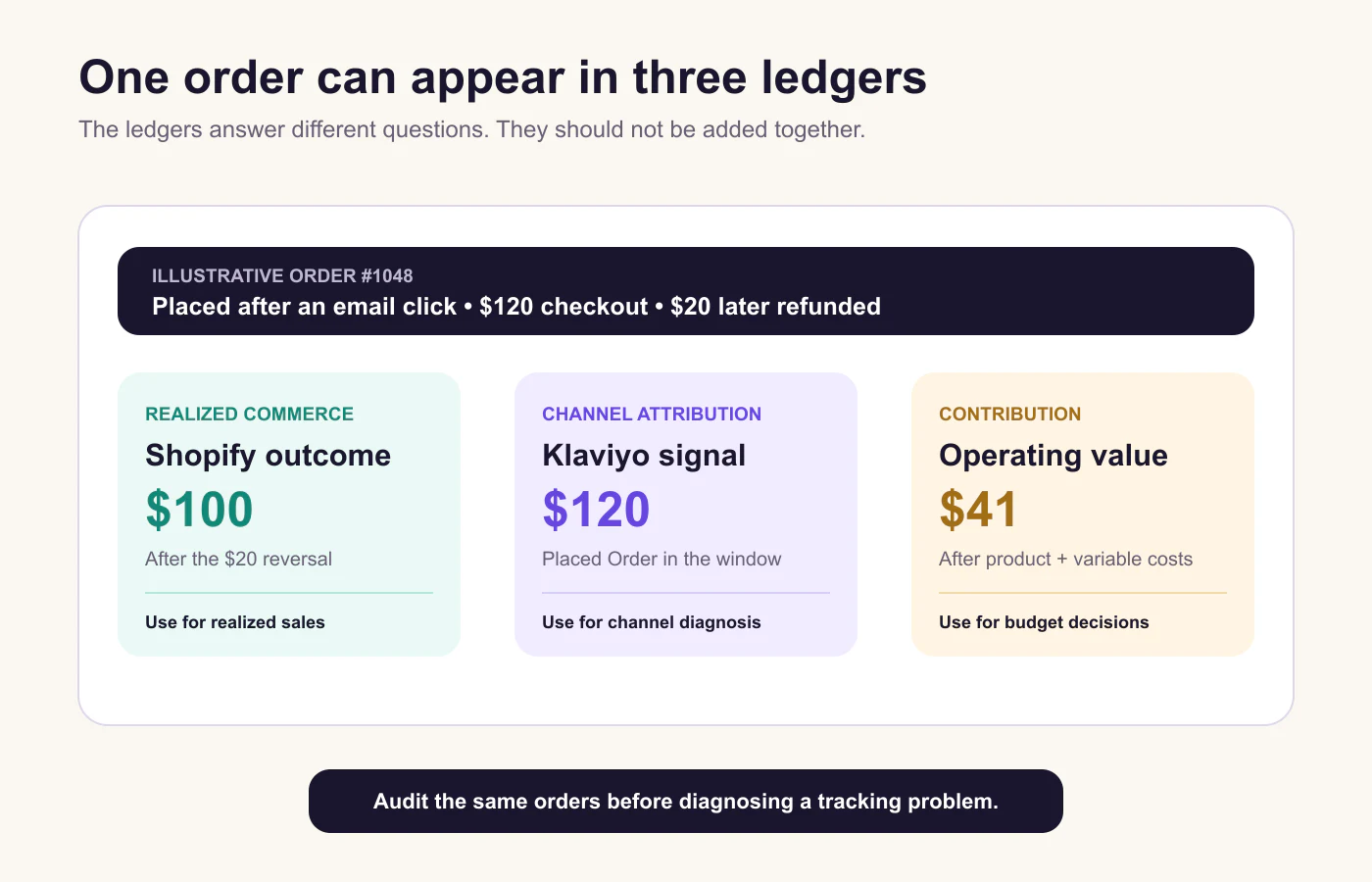
The image uses an illustrative order, not a customer case study.
Ledger 1: realized commerce
Owner: Shopify order and finance evidence.
Use it for:
- Store sales
- Order and product performance
- Refund-adjusted cohorts
- Reconciliation with accounting
Boundary: it does not assign exclusive causal credit to a marketing channel.
Ledger 2: channel-attributed events
Owner: Klaviyo's configured attribution view for email and SMS analysis.
Use it for:
- Comparing messages under the same attribution contract
- Diagnosing flows and campaigns
- Investigating customer journeys
- Finding missing tracking or event delivery
Boundary: it is not additive realized revenue and may preserve event values differently from later commerce adjustments.
Ledger 3: contribution
Owner: an operating cost ledger using realized commerce plus approved variable costs.
Use it for:
- Budget decisions
- Product and cohort economics
- Scale, hold, cut, or fix-data reviews
Boundary: it is not a substitute for complete accounting net profit.
For a deeper calculation, use the Ad Profit Calculator and the guide to Shopify profit after ads, COGS, fees, and refunds.
Which number should you use?
| Decision | Primary ledger | Supporting evidence |
|---|---|---|
| Report realized store sales | Shopify commerce outcome | Accounting reconciliation |
| Compare Klaviyo flows | Klaviyo attributed events | Same window, metric, audience, and send-date rule |
| Evaluate paid or lifecycle budget | Contribution | Channel signals and customer mix |
| Debug tracking | Order-level event audit | Consent, identity, UTMs, integration delivery |
| Compare all channels | Realized commerce plus separate channel views | Never add claimed revenue |
This contract resolves the emotional question — “Which platform is right?” — into an operational one: “Which ledger owns this decision?”
When a mismatch is expected
A mismatch is usually expected when:
- The attribution windows differ.
- Shopify and Klaviyo use different revenue formulas.
- The selected date basis differs.
- Refunded or canceled orders remain in the original conversion-event value.
- Several channels legitimately claim an interaction with the same order.
- The sampled orders explain the aggregate gap.
Document the gap and keep reporting with stable definitions.
When to investigate
Investigate when:
- Expected Placed Order events are repeatedly missing.
- Attributed value uses an unexpected currency or impossible amount.
- The same event appears more than once without a documented reason.
- An account setting changed without being reflected in reporting.
- A custom checkout or integration change aligns with the start of the discrepancy.
- The mismatch remains after date, time zone, order state, and revenue definitions are aligned.
Do not use a universal percentage threshold. A small mismatch can matter when it reveals systematic duplicate events. A large mismatch can be expected after a high-refund promotion. Define the threshold by decision impact and evidence pattern.
Compare Klaviyo flows fairly
Keep the reporting contract stable across flows:
- Same conversion metric
- Same attribution-window settings
- Same event-date or message-date view
- Same time zone and currency
- Comparable customer lifecycle stage
- Comparable discount and product economics
- Mature enough refund window
Then compare more than attributed revenue:
- Delivered messages
- Clicked profiles
- Conversion events
- Realized order outcomes
- Unsubscribe and complaint signals
- Contribution where reliable cost data exists
A win-back flow and an abandoned-cart flow serve different audiences and moments. A raw revenue ranking can reward the flow closest to an already likely purchase. Use the result to investigate incrementality and customer experience, not to declare causal truth.
For broader workflow design, see the Shopify marketing automation guide and how to use marketing automation for ecommerce.
Run a repeatable operator workflow
A durable reconciliation is explicit:
- Detect — Flag a mismatch beyond the merchant's decision threshold.
- Align — Normalize date, time zone, currency, revenue definition, and order states.
- Inspect — Read the current Klaviyo attribution settings.
- Sample — Audit deliberately varied Shopify orders and Klaviyo events.
- Classify — Expected contract, duplicate credit, timing, tracking, or unresolved.
- Recommend — Keep definitions, fix instrumentation, or change the reporting contract.
- Verify — Re-run the same sample and aggregate checks after the next complete window.
The output should separate:
- Verified source facts
- Interpretation
- Missing evidence
- Proposed next action
If the evidence cannot distinguish an expected mismatch from a tracking fault, say so. “Unresolved” is safer than an invented explanation.
Explain the mismatch with BizSidekick
BizSidekick can compare authorized Shopify commerce evidence with supported connected Klaviyo data, trace sampled orders through the available events, and explain which differences it can verify. Connection coverage depends on the authorized integration. Any governed change is prepared for review and requires confirmation.
Use a bounded prompt:
Compare Klaviyo-attributed orders with Shopify commerce outcomes for the last
four complete weeks. Use the store time zone and one currency. Record the
current attribution settings, sample five varied orders, and classify each
difference as expected, timing, definition, tracking, duplicate credit, or
unresolved. Recommend changes for review, but do not modify a flow, campaign,
or integration until I approve.
You can also compare the channel role with the guide to tracking ROAS across Meta, Google, and TikTok.
Frequently asked questions
Why is Klaviyo revenue higher than Shopify email revenue?
The reports can use different attribution windows, eligible interactions, revenue definitions, refund treatment, dates, and channel-credit models. Align the contract and audit the same orders before assuming one platform is wrong.
Which revenue number should I use?
Use Shopify commerce outcomes for realized store sales. Use Klaviyo attributed events to compare email and SMS performance under a stable Klaviyo contract. Use a separate contribution ledger for budget decisions.
Should I add Klaviyo and Meta attributed revenue?
No. Both platforms can claim the same order under their own attribution rules. Keep each channel view for diagnosis, and count the Shopify order once in realized commerce.
Does a refund always update the original Klaviyo revenue event?
Do not assume that it does. Review the current Klaviyo Shopify data reference and compare the original conversion event with later Shopify commerce outcomes.
How many orders should I audit?
Start with at least five deliberately varied orders and expand the sample when the cause remains unclear or the business impact is material. The quality of the sample matters more than comparing only the largest orders.
Keep reading
Continue with a guide that supports your next ecommerce decision.